PHP2Shell triggers in memory before WordPress core, plugins, or security filters ever initialize. With over 22 million public servers exposed, here is a forensic breakdown of CVE-2026-109618, hosting provider responses, and the emergency patching protocol.
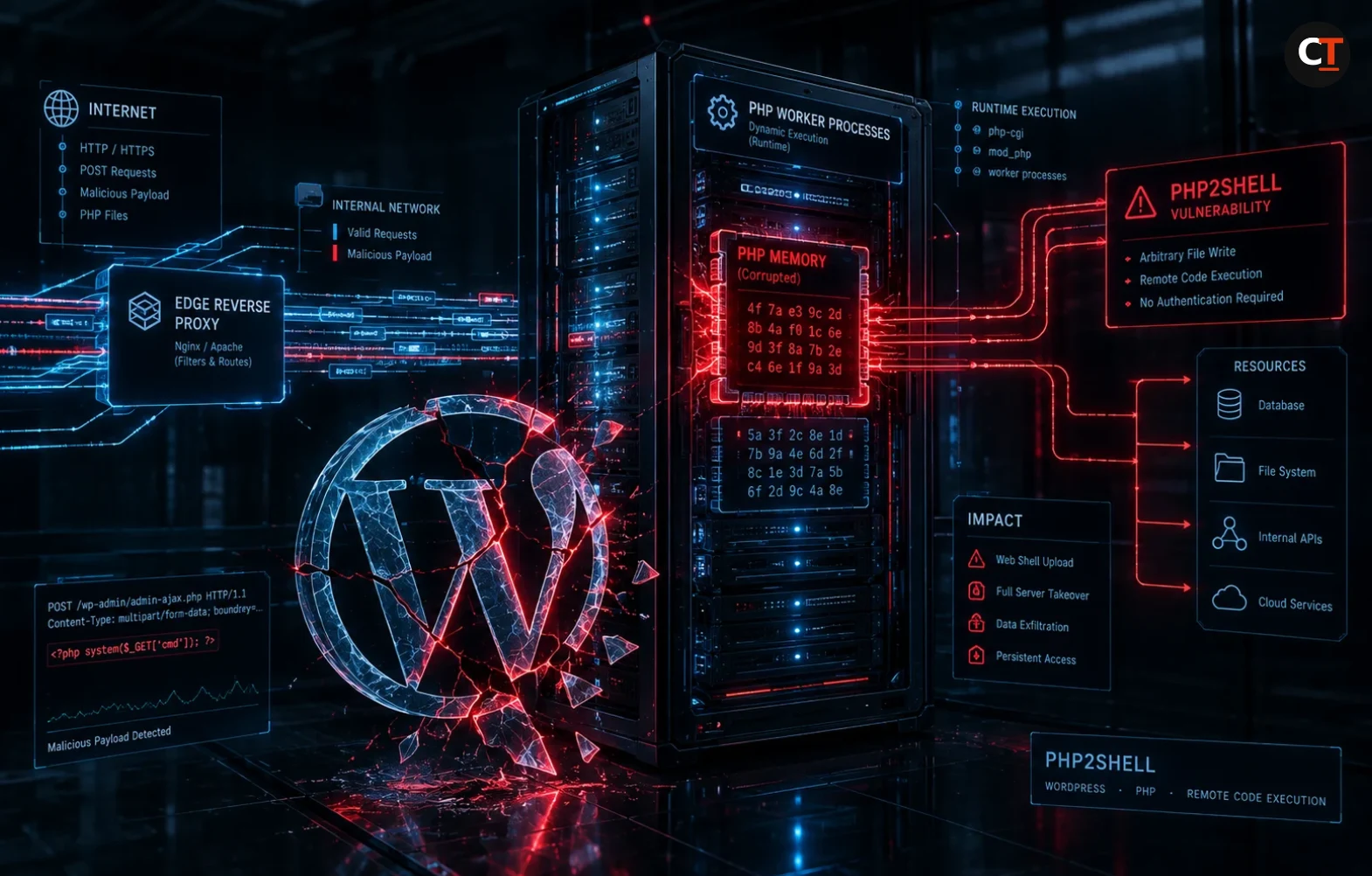
- WordPress can’t patch this: PHP2Shell (CVE-2026-109618 and CVE-2026-109619) is a flaw in PHP’s core C runtime, not in WordPress application code. The exploit fires during multipart body parsing before index.php or security plugins execute.
- Wiz Proved Pre-Auth RCE: Security firm Wiz demonstrated unauthenticated shell execution against default WordPress container images using memory corruption during out-of-memory aborts.
- The Hosting Provider Split: Managed platforms like Automattic (Pressable, WordPress VIP) and Hostinger patched their container fleets immediately. In contrast, unmanaged VPS instances and standard cPanel shared hosting accounts remain exposed until administrators upgrade to PHP 8.2.35, 8.3.36, 8.4.27, or 8.5.12 and manually restart worker processes.
The flaw had nothing to do with outdated themes, abandoned WooCommerce extensions, or weak database passwords. It was PHP2Shell, a pair of memory corruption vulnerabilities in the PHP runtime itself that bypass user-space security controls entirely. By the time Palo Alto Networks’ Cortex Xpanse scanner completed an internet-wide survey, the sensor telemetry showed more than 22.6 million exposed servers worldwide running vulnerable PHP configurations.
Because WordPress powers more than 43 percent of all websites globally, it serves as the primary real-world target for this attack vector. Security research firm Wiz demonstrated that an attacker can obtain an interactive remote shell on an out-of-the-box WordPress deployment with a single HTTP POST request. No credentials, no file uploads, and no privileged plugins required.
Understanding the operational reality of PHP2Shell requires dispelling the myth of application-level defense. If the underlying language engine is compromised at the memory allocation boundary, no WordPress security plugin can protect you. Here is how the exploit works, how the web hosting industry is reacting, and what sysadmins must do right now.
The Technical Mechanics: Out-of-Memory Aborts and Stale Worker State
To understand why PHP2Shell is so lethal, one must examine how the PHP interpreter handles incoming HTTP requests. Under normal execution, when a client submits a multipart form request (the standard protocol for form submissions and file uploads), the PHP engine parses headers, field boundaries, and payload streams in native C before passing execution to the web application.
Table 1: Forensic Overview of the PHP2Shell Vulnerabilities
| CVE Identifier | CVSS v4 Score | Vulnerable Component | Root Failure Mechanism | Exploitation Precondition |
|---|---|---|---|---|
| CVE-2026-109618 (GHSA-w8hw-w9fx-j79w) |
9.2 Critical | PHP Core Engine (Multipart Parsing) |
Out-of-memory handling uses longjmp() to abort, leaving half-initialized structures that free attacker-controlled data |
Unauthenticated HTTP POST request with crafted multipart boundaries |
| CVE-2026-109619 (GHSA-6wmf-4rv5-p3rp) |
9.2 Critical | PHP Request Cleanup (Global State Handling) |
Worker processes fail to flush state after fatal errors, causing subsequent requests to trigger use-after-free conditions | Enabled session.upload_progress or an early INI warning triggers |
The CVE-2026-109618 Breakdown: The longjmp() Trap
PHP enforces memory limits via its familiar memory_limit directive (often set to 128M or 256M in WordPress environments). When a request exceeds this boundary, the engine does not perform a graceful unwinding of the call stack. Instead, it invokes the C runtime function longjmp() to immediately jump out of execution and abort the request.
The vulnerability arises when an allocation failure occurs mid-stream during multipart body parsing. An attacker crafts a multipart request containing:
- Streams with no usable
Content-Lengthheader. - An arbitrarily large number of headers per multipart section.
- Repeated empty file control structures that bypass
max_file_uploadscounters.
When memory runs out during this parsing step, longjmp() interrupts the process while internal hash tables and buffer pointers are only partially populated. When PHP subsequently attempts to execute its shutdown cleanup, the garbage collector attempts to free memory addresses that still contain attacker-supplied data from previous allocations. This creates a classic use-after-free heap condition, allowing the attacker to overwrite function pointers and pivot execution into arbitrary shell commands.
The CVE-2026-109619 Breakdown: Stale Worker Contamination
The companion flaw, CVE-2026-109619, targets PHP’s process reuse model. In high-performance web environments like PHP-FPM or Apache worker pools, worker processes stay alive across thousands of requests to avoid the latency of reinitializing the runtime. If an unhandled fatal error occurs, PHP is supposed to scrub global memory before accepting the next connection.
Under specific configurations, residual state from a failed request persists across worker lifecycles. A key culprit is PHP’s default session upload progress mechanism. (session.upload_progress.enabled = 1). When an attacker sends a crafted fatal request followed immediately by a second payload targeting the same worker, the second request reads the stale pointer, triggering memory corruption that achieves code execution.
mod_php, the entire parsing phase and the resulting memory corruption happen in server memory before Apache ever invokes the PHP interpreter for index.php. WordPress does not run. Plugins do not load. Firewall plugins like Wordfence or iThemes never see the request packets, making application-layer defenses completely ineffective.The Hosting Industry Scorecard: Who Patched and Who Stood Still
Because site owners cannot patch the underlying PHP binary through the WordPress administrative dashboard, protection depends entirely on web hosting infrastructure. The response across the hosting landscape reveals a stark divide between managed cloud platforms and traditional shared hosting providers.
Table 2: Hosting Provider and Security Vendor Response Matrix
| Provider / Vendor | Official Response Status | Mitigation Action Deployed | Customer Action Required |
|---|---|---|---|
| Automattic (Pressable, VIP, WP Cloud) |
Confirmed Protected (October 21) |
Upstream container fleet updated; PHP runtimes patched and workers recycled automatically | None. All managed environments protected at the infrastructure tier. |
| Hostinger | Confirmed Protected (October 22) |
Deployed deny-mode ModSecurity rules; disabled session.upload_progress; rolled out patched PHP binaries |
Managed shared hosting protected; VPS customers must manually patch. |
| CloudLinux (Imunify360) |
Ruleset 8.88 Released | Shipped automatic blocking rule for multipart session upload progress exploit patterns | Ensure Imunify360 WAF is enabled and running version 8.88 or higher. |
| cPanel | Security Advisory Issued | Published critical update bulletin; updated upstream EasyApache package repositories | Server root administrators must run system package updates and restart services. |
| Cloudflare | WAF Rules Deployed (October 21) |
Released seven managed WAF rules using full-transaction request and response inspection | Verify that Cloudflare WAF managed ruleset is enabled in block mode. |
| GoDaddy / Bluehost / SiteGround | Unconfirmed Public Rollout | No verified platform-wide public disclosure confirming automated PHP runtime fleet updates | High Risk. Site owners must check PHP build versions and contact support. |
Automattic confirmed that its enterprise and developer platforms, including WordPress VIP and Pressable Managed WordPress Hosting, had already applied upstream container updates across their entire fleet. Because these platforms run isolated container architectures with centralized runtime orchestration, customers did not need to run a single terminal command or experience downtime.
The situation is far more dangerous on budget shared hosting and unmanaged Virtual Private Servers. Providers like GoDaddy and Bluehost have not published transparent, platform-wide audit confirmations. On shared cPanel servers, millions of small business websites share underlying PHP-FPM pools that have not been recycled by their hosting administrators, leaving them wide open to automated exploitation sweeps.
This incident reinforces the structural lessons we documented in the 72-hour DevSecOps cascade: when runtime infrastructure is unmanaged, application developers are left carrying the liability.
The Critical Distinction: Upstream Patching vs. Temporary WAF Filters
Following the public disclosure, security vendors like Cloudflare, Imunify360, and Wordfence deployed Web Application Firewall (WAF) virtual patches to block known exploit signatures. While these rules provide essential breathing room, security researchers have issued a unanimous warning: virtual patches are temporary stopgaps, not permanent cures.
Attackers continuously refine exploit payloads to bypass regex patterns and matchers. For instance, modifying the multipart boundary padding or alternating byte encoding can disguise the payload from an edge WAF while still triggering the out-of-memory condition in the underlying PHP C parser.
The Sysadmin Emergency Runbook: How to Triage and Fix PHP2Shell
If you manage your own servers, run unmanaged cloud VPS instances, or administer cPanel systems, follow this exact step-by-step remediation procedure immediately.
Table 3: The 4-Step Remediation Sequence
| Step | Objective | Command / Directive | Critical Verification |
|---|---|---|---|
| 1. Build Verification | Confirm whether the active PHP binary is patched | php -v |
Must match 8.2.35, 8.3.36, 8.4.27, or 8.5.12 exactly |
| 2. Package Upgrade | Pull updated distribution binaries | sudo apt update && sudo apt --only-upgrade install php8.3-fpm |
Verify distribution changelog mentions CVE-2026-109618 |
| 3. Worker Process Recycling | Flush unpatched worker processes from memory | sudo systemctl restart php8.3-fpm && sudo systemctl restart nginx |
Verify process start timestamps with ps aux | grep php |
| 4. Surface Hardening | Disable risky default INI configurations | session.upload_progress.enabled = Off |
Check runtime status with php -i | grep upload_progress |
Step 1: Check Your Exact PHP Build String
Do not simply check whether you are running PHP 8.3 or PHP 8.4. You must inspect the exact release version. Run the following command on your server terminal:
php -vVerify that your output matches or exceeds one of the four patched security releases:
- PHP 8.2: Version
8.2.35or higher - PHP 8.3: Version
8.3.36or higher - PHP 8.4: Version
8.4.27or higher - PHP 8.5: Version
8.5.12or higher
If your server reports an older version (for instance, PHP 8.3.35 or PHP 8.2.34), your server is vulnerable. Note that PHP 8.1 and earlier branches have reached End-of-Life (EOL) from the upstream PHP Group; if you run PHP 7.4 or 8.1, you will not receive an official patch and must upgrade to a supported PHP branch immediately.
Step 2: Install Packages and Execute Mandatory Service Restarts
Updating the package files on disk does not secure a running server. The operating system leaves currently running worker processes active in RAM. You must explicitly restart your application workers:
# For Ubuntu/Debian running PHP-FPM with NGINX
sudo apt-get update
sudo apt-get --only-upgrade install php8.3-fpm php8.3-cli php8.3-common
# MANDATORY: Restart the FPM daemon to kill vulnerable child workers
sudo systemctl restart php8.3-fpm
sudo systemctl restart nginx

# For RHEL/AlmaLinux/cPanel Apache deployments
sudo dnf upgrade php php-fpm
sudo systemctl restart php-fpm
sudo systemctl restart httpd
Step 3: Apply the Stopgap ModSecurity Directive
If you operate a cPanel/WHM server with Imunify360 or standard ModSecurity enabled, verify that your ruleset is current:
# Verify Imunify360 Apache Ruleset Version
cat /etc/apache2/conf.d/modsec_vendor_configs/imunify360-full-apache/VERSION
# Must return version 8.88 or higher
If you do not have Imunify360 and cannot upgrade PHP immediately due to code compatibility constraints, inject this custom ModSecurity rule into your global configuration to drop the publicly circulating exploit shape:
# Stopgap Mitigation: Block PHP2Shell multipart attack surface
SecRule REQUEST_BODY "@rx (?i)PHP_SESSION_UPLOAD_PROGRESS" \
    "id:100109618,\
    phase:2,\
    deny,\
    status:403,\
    log,\
    msg:'PHP2Shell stopgap: block PHP session upload progress in multipart request (CVE-2026-109618/109619)'"
Step 4: Hardening PHP INI Configurations
Mitigate the second exploitation vector (CVE-2026-109619) by disabling session upload progress tracking across your php.ini configuration files. In your server configuration, set:
; Disable session upload progress tracking in php.ini or PHP-FPM pool configs
session.upload_progress.enabled = Off

; Restrict maximum POST size to realistic thresholds
post_max_size = 16M
upload_max_filesize = 16M
After saving changes, restart your PHP-FPM service once more to apply the configuration globally across all execution pools.
Architectural Takeaways: Moving Away from Fragile Shared Hosting
The PHP2Shell emergency serves as an indictment of legacy hosting architectures. For fifteen years, small businesses and growing enterprises have treated web hosting as a low-cost commodity, paying three dollars a month for shared cPanel accounts with unpatched runtime daemons and zero container isolation.
When a vulnerability like PHP2Shell arrives, unmanaged shared hosting turns into an existential business risk. A single compromised neighbor on a shared server can corrupt shared memory pools, sniff local environment variables, or bring down the entire web server daemon.
Modern web infrastructure demands a clear architectural separation:
- Isolated Container Execution: Applications must run inside immutable, single-tenant containers where memory limits are enforced by Linux kernel cgroups rather than fragile user-space language runtimes. Platforms like Pressable Enterprise Cloud Hosting build this isolation directly into the platform, ensuring zero cross-tenant contamination.
- Edge-to-Origin Cloaking: Origin servers must never expose public ports 80, 443, or 22 directly to the public internet. By cloaking your origin behind zero-trust tunnels, mass-scanning botnets cannot discover your unpatched PHP runtimes.
- Automated Worker Lifecycle Management: Stale workers should never persist indefinitely. Enterprise hosting platforms automatically recycle worker processes after fixed execution counts to purge potential memory leaks and use-after-free traps.
The agency lead in Chicago did not spend their weekend updating sixty individual WordPress dashboards. Instead, they migrated their most critical e-commerce clients to containerized, fully managed environments where runtime security is handled continuously at the platform tier. In an era where runtime zero-days bypass application firewalls entirely, choosing the right infrastructure foundation is the only security strategy that scales.
Disclaimer: CryptechToday is for educational and news purposes only. It is not financial or investment advice.